 Bring Back My Google Watchlist
How to update
Two steps, about a minute. Your list stays as it is.
Latest version: …
-
Download it into the same place as before.
Unzip it where your old
bring-back-my-google-watchlistfolder is, and let it replace the old one (on a Mac, choose Replace). -
Click refresh. Click the extension's icon in your toolbar, then Manage extension at the bottom, then the ↻ at the top right. Done.
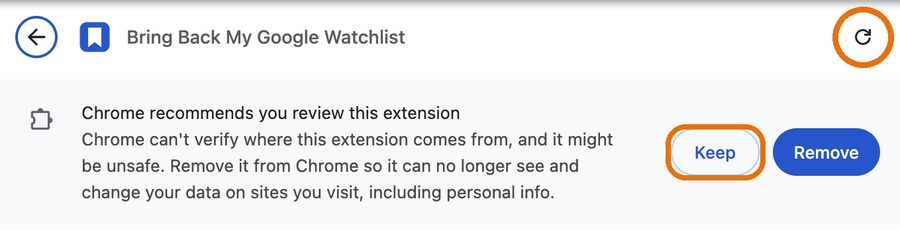
Can't remember where the old folder is? On that same Manage extension page, it's listed under Source. If Chrome shows “Chrome recommends you review this extension”, click Keep. And don't click Remove: that deletes the list stored in this browser.
Something went wrong?
- The card shows an error after reloading: the folder may be the zip's outer folder or an unfinished unzip. Delete it, unzip the download again, and repeat step 1.
- Your list looks empty: if you're signed in to sync, open the extension's icon and click Sync now. If not, you probably loaded a fresh copy instead of replacing the old folder. Put the old folder back and reload.
- Still stuck? Open an issue on GitHub or email kaizar.raja@gmail.com.